Warning: Undefined variable $query_editor in /home/xs715986/grits-osaka.com/public_html/testing-site/wp-content/themes/grits_theme/content-page.php on line 3
Warning: Undefined variable $query_editor in /home/xs715986/grits-osaka.com/public_html/testing-site/wp-content/themes/grits_theme/content-page.php on line 4
テキストエディターはアップグレードされ、以前よりも使いやすくなりました。
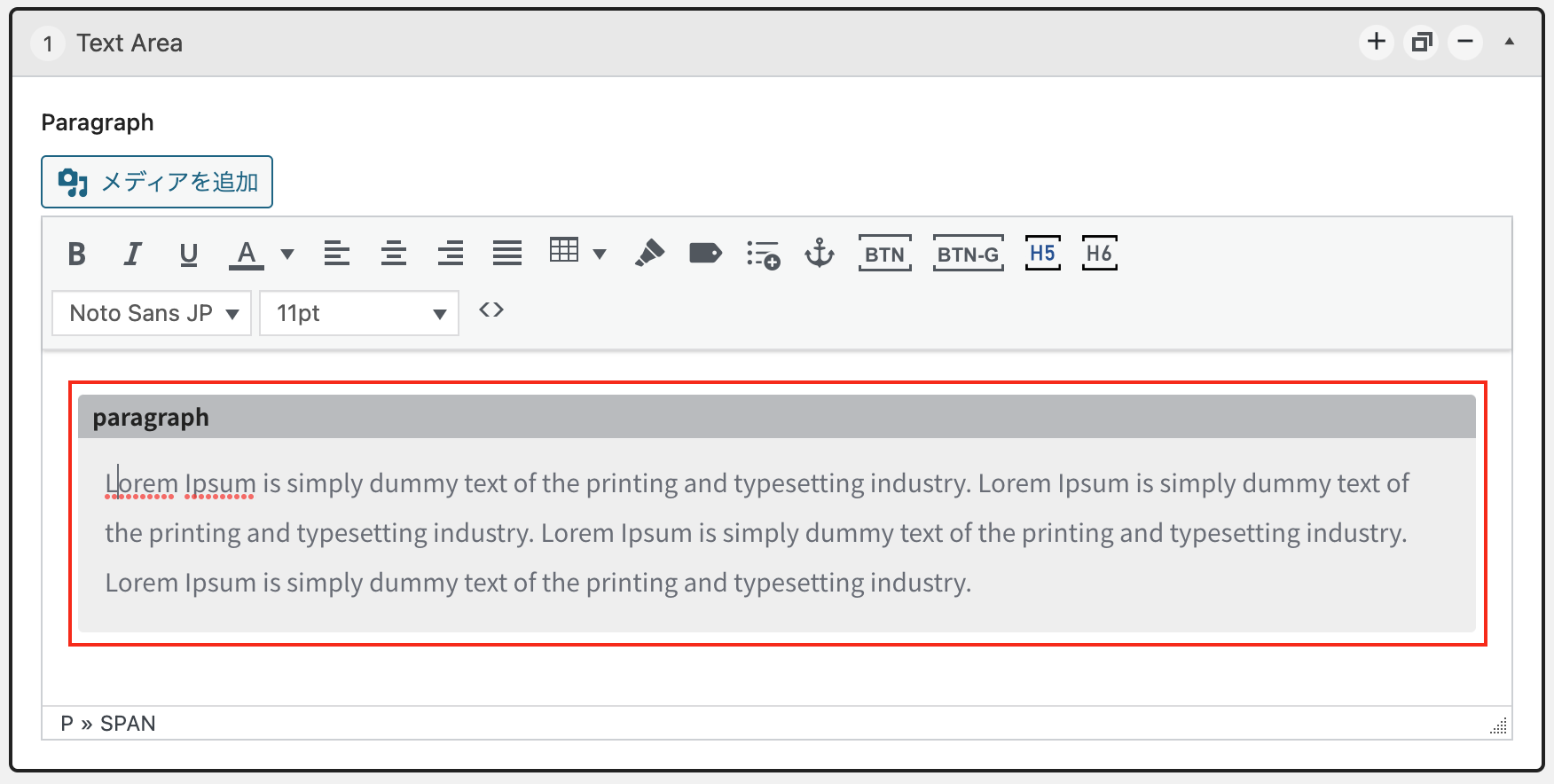
コンテンツはカードに表示されます。他のコンテンツと区別するため、各カードにはそのコンテンツに対応する見出しがあります。
例:テキスト→ paragraph、リスト→ list、画像→ media …
新しい機能のいくつかを紹介します
Highlight text
 これは、テキストを強調表示する機能です.
方法:強調したいテキストを選択し、ハイライトアイコンをクリックしてください。
Styleウィンドウが表示されますので、強調表示したいスタイルを選択してください。
例: Lorem Ipsum is simply dummy text of the printing and typesetting industry. Lorem Ipsum has been the industry’s standard dummy text ever since the 1500s, when an unknown printer took a galley of type and scrambled it to make a type specimen book. It has survived not only five centuries, but also the leap into electronic typesetting, remaining essentially unchanged. It was popularised in the 1960s with the release of Letraset sheets containing Lorem Ipsum passages, and more recently with desktop publishing software like Aldus PageMaker including versions of Lorem Ipsum.
現在のバージョンでは、カスタムカラーを選択することはできません。カスタムカラーを選択できるようにするため、今後のバージョンで機能が追加されます。
Label
 1つの段落に見出しラベルを作成する
方法:ラベルを作成したい文章を選択してください。その後、ラベルアイコンをクリックし、Styleウィンドウを表示させ、表示したいスタイルを選択してください。
例:
: lorem Ipsum is simply dummy text of the printing and typesetting industry. Lorem Ipsum has been the industry’s standard dummy text ever since the 1500s, when an unknown printer took a galley of type and scrambled it to make a type specimen book.
: lorem Ipsum is simply dummy text of the printing and typesetting industry. Lorem Ipsum has been the industry’s standard dummy text ever since the 1500s, when an unknown printer took a galley of type and scrambled it to make a type specimen book.
: lorem Ipsum is simply dummy text of the printing and typesetting industry. Lorem Ipsum has been the industry’s standard dummy text ever since the 1500s, when an unknown printer took a galley of type and scrambled it to make a type specimen book.
ラベルの色は、テーマの色に自動的に変更されます。カスタムカラーを選択できるようにするため、今後のバージョンで機能が追加されます。
List
 単純なリストを作成します。
方法:リストを作成するには、リスト追加アイコンをクリックし、Styleウィンドウが表示されたら表示したいスタイルを選択してください。
リストアイテムを追加するにはEnterを1回押してください。
リストモードを終了するにはEnterを2回押してください。
現在、3つのリストタイプがあります。
Default
- Item Name
- Item Name Item Name Item Name
- Item Name Item Name
- Item Name
Number
- Item Name
- Item Name Item Name
- Item Name
Step
- Item Name Item Name Item Name
- Item Name
- Item Name Item Name
- Item Name
リストの色は、テーマの色に自動的に変更されます。カスタムカラーを選択できるようにするため、今後のバージョンで機能が追加されます。
Button
 ボタンを追加する
方法:ボボタン追加アイコンをクリックし、ボタンの位置を選択するウィンドウが表示されます。表示したいボタンの位置を選択してください。ボタンが追加された後、ボタンをクリックしてボタンの名前とリンクを変更します。
ボタンのデザインは、ウェブサイトのデザインに従って変更されます。
Button Group
 複数のボタンを同時に表示する
方法:ボタングループを追加するために、ボタングループのアイコンをクリックしてください。ボタングループのウィンドウが表示され、表示するボタンの数を選択してください。
ボタングループを追加したら、ボタンの名前とリンクを変更するためにボタンをクリックしてください。 ただし、ボタンには表示位置を選択できません。 グループにはデフォルトで2つのボタンが1行に表示されます。
Anchor Link
 文章内でリンクを作成します。
方法:対象となるテキストを選択し、アンカーアイコンをクリックします。スタイルウィンドウが表示されますので、表示するアンカーリンクのタイプを選択してください。リンクを編集するには、リンクをクリックしてください。
例: Lorem Ipsum is simply dummy text of the printing and typesetting industry. Lorem Ipsum has been the industry’s standard dummy text ever since the 1500s, when an unknown printer took a galley of type and scrambled it to make a type specimen book.
Anchor LinkとButtonは似た機能ですが、それぞれ異なる場面で使われます。作成したコンテンツに適したタイプを選択してください。
Table
 テーブル形式のコンテンツを表示する。
デフォルトスタイル
| td | td | td | td |
| td | td | td | td |
| td | td | td | td |
| td | td | td | td |
ヘッダーセル
方法:テーブルアイコンをクリックします。/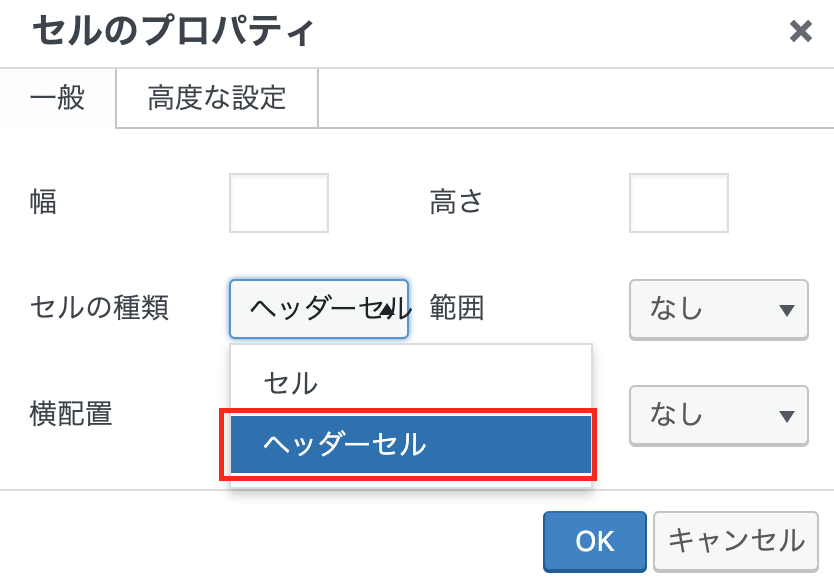 行と列の数を選択します。/ テーブルが作成されたら、ヘッダーにする行を選択します。/ 再びテーブルアイコンをクリックします。/ セルを選択して、[セルのプロパティ]をクリックします。/セルプロパティウィンドウが表示されます。/ セルの種類で、[ヘッダーセル]を選択します。/ 完了するためにOKをクリックします。
テーブルの色は、テーマの色に自動的に変更されます。
| th | th | th | th |
|---|---|---|---|
| td | td | td | td |
| td | td | td | td |
| td | td | td | td |
Media
 画像、ビデオ、ファイルなど、さまざまなコンテンツを追加できます。
文章に画像を追加する方法:
文章を作成した後、画像を追加する場所にマウスカーソルを置き、メディアを追加アイコンをクリックして、追加したい画像を選択してください。選択が完了したら、投稿に挿入をクリックします。画像が文章に追加されたら、位置、キャプション、リンクを編集するには、画像を再度クリックしてください。
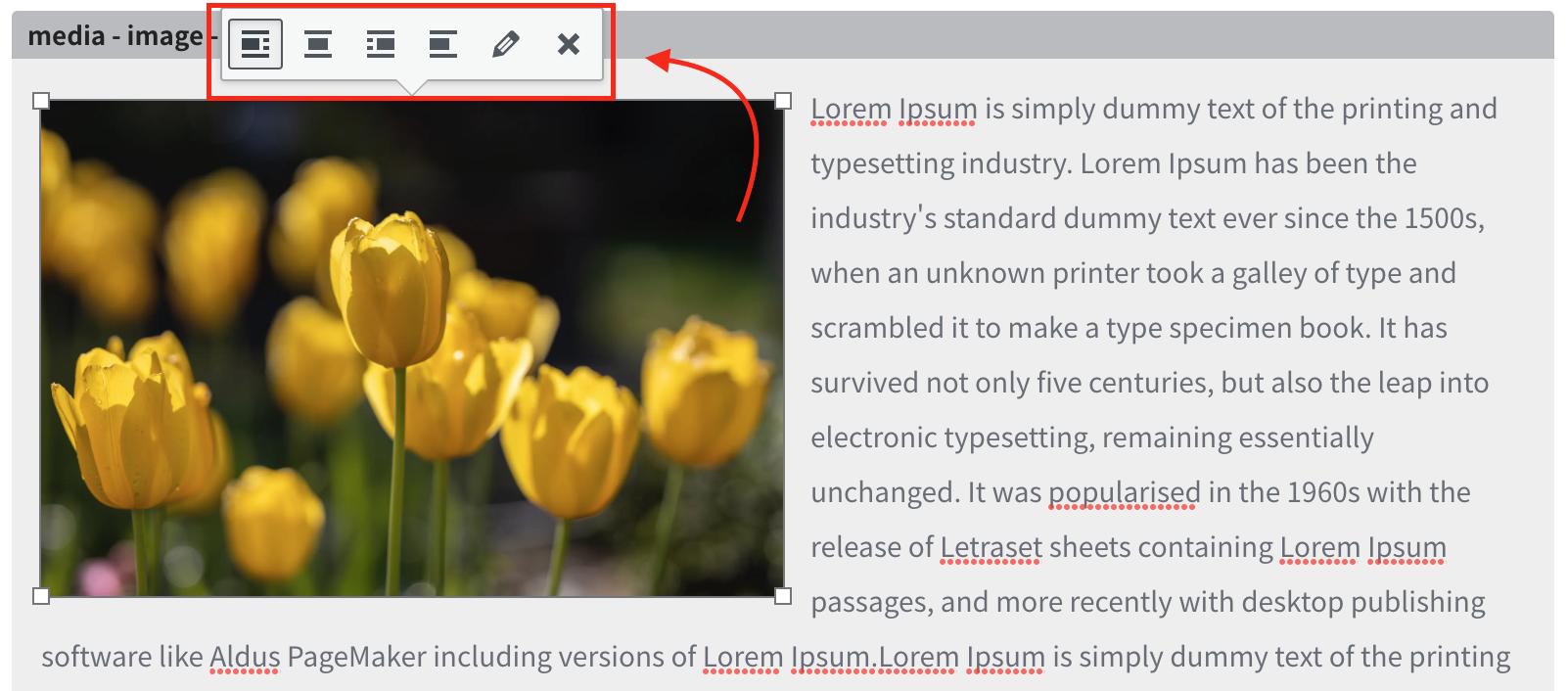 注意: 画像のサイズに関しては、最高の画質を得るためにフルサイズを選択することが望ましいです。
いくつかの例:
Lorem Ipsum is simply dummy text of the printing and typesetting industry. Lorem Ipsum has been the industry’s standard dummy text ever since the 1500s, when an unknown printer took a galley of type and scrambled it to make a type specimen book.  It has survived not only five centuries, but also the leap into electronic typesetting, remaining essentially unchanged. It was popularised in the 1960s with the release of Letraset sheets containing Lorem Ipsum passages, and more recently with desktop publishing software like Aldus PageMaker including versions of Lorem Ipsum.Lorem Ipsum is simply dummy text of the printing and typesetting industry. Lorem Ipsum has been the industry’s standard dummy text ever since the 1500s, when an unknown printer took a galley of type and scrambled it to make a type specimen book. It has survived not only five centuries, but also the leap into electronic typesetting, remaining essentially unchanged. It was popularised in the 1960s with the release of Letraset sheets containing Lorem Ipsum passages, and more recently with desktop publishing software like Aldus PageMaker including versions of Lorem Ipsum.Lorem Ipsum is simply dummy text of the printing and typesetting industry. Lorem Ipsum has been the industry’s standard dummy text ever since the 1500s, when an unknown printer took a galley of type and scrambled it to make a type specimen book.
  It has survived not only five centuries, but also the leap into electronic typesetting, remaining essentially unchanged. It was popularised in the 1960s with the release of Letraset sheets containing Lorem Ipsum passages, and more recently with desktop publishing software like Aldus PageMaker including versions of Lorem Ipsum.Lorem Ipsum is simply dummy text of the printing and typesetting industry. Lorem Ipsum has been the industry’s standard dummy text ever since the 1500s, when an unknown printer took a galley of type and scrambled it to make a type specimen book. It has survived not only five centuries, but also the leap into electronic typesetting, remaining essentially unchanged. It was popularised in the 1960s with the release of Letraset sheets containing Lorem Ipsum passages, and more recently with desktop publishing software like Aldus PageMaker including versions of Lorem Ipsum.Lorem Ipsum is simply dummy text of the printing and typesetting industry. Lorem Ipsum has been the industry’s standard dummy text ever since the 1500s, when an unknown printer took a galley of type and scrambled it to make a type specimen book. It has survived not only five centuries, but also the leap into electronic typesetting, remaining essentially unchanged. It was popularised in the 1960s with the release of Letraset sheets containing Lorem Ipsum passages, and more recently with desktop publishing software like Aldus PageMaker including versions of Lorem Ipsum.Lorem Ipsum is simply dummy text of the printing and typesetting industry.
  Lorem Ipsum has been the industry’s standard dummy text ever since the 1500s, when an unknown printer took a galley of type and scrambled it to make a type specimen book. It has survived not only five centuries, but also the leap into electronic typesetting, remaining essentially unchanged. It was popularised in the 1960s with the release of Letraset sheets containing Lorem Ipsum passages, and more recently with desktop publishing software like Aldus PageMaker including versions of Lorem Ipsum.Lorem Ipsum is simply dummy text of the printing and typesetting industry. Lorem Ipsum has been the industry’s standard dummy text ever since the 1500s, when an unknown printer took a galley of type and scrambled it to make a type specimen book.
  It has survived not only five centuries, but also the leap into electronic typesetting, remaining essentially unchanged. It was popularised in the 1960s with the release of Letraset sheets containing Lorem Ipsum passages, and more recently with desktop publishing software like Aldus PageMaker including versions of Lorem Ipsum.
ビデオの追加方法:
メディアを追加をクリックして、表示したいビデオを選択します。選択後、再度ビデオをクリックして編集します。ここでは、ビデオを自動再生またはループするように設定できます。
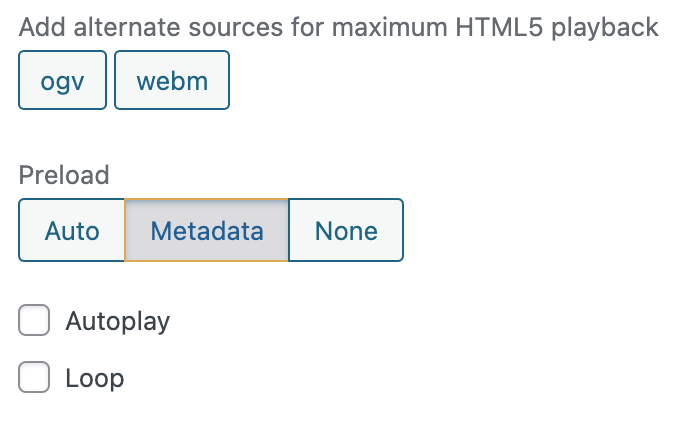
例:dummy video
:他のソース(youtube)にある動画の場合は、埋め込み機能を参照して、ページにビデオを埋め込んでください。その他に、PDF、XLSX、DOCなどのファイルや音声ファイルなども追加できます。
Warning: Undefined variable $query_editor in /home/xs715986/grits-osaka.com/public_html/testing-site/wp-content/themes/grits_theme/content-page.php on line 4